A2P Campaign Evidence
SMS Opt-In Flow
Strategy Calculator is operated by Karan Patel.
This page is compliance evidence, not a live enrollment form. Strategy Calculator's SMS opt-in happens inside the authenticated web application, under Settings → Notifications, which is not publicly reachable. The screenshots below show that exact flow, run against the application's deterministic test fixtures rather than a real phone number.
1. Enter a phone number
In Settings → Notifications, the user enters a mobile phone number and requests a one-time verification code. Strategy Calculator sends the code through Twilio Verify.
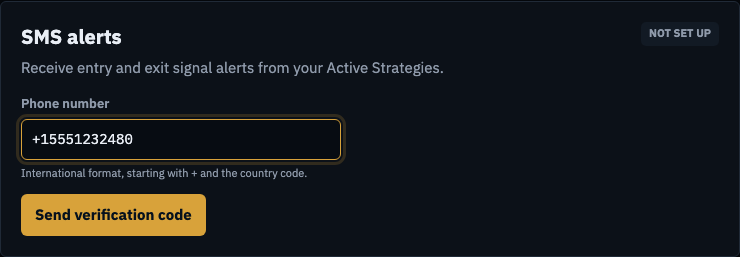
Phone number entry, before verification. 2. Verify the number and give explicit consent
The user enters the code to confirm ownership of the number. Next to it is an SMS consent disclosure that is unchecked by default. Verifying the number alone does not turn on SMS: only when the user checks the box does the button become Verify & enable SMS. A verified number without consent receives no alerts until the user grants consent.
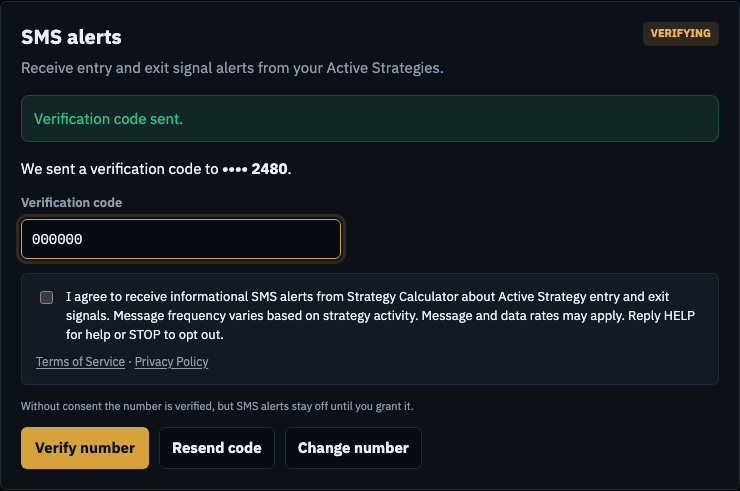
Verification code entered; consent still unchecked. 3. Choose which Active Strategies send alerts
With a verified number and consent on file, the user turns SMS alerts on for each Active Strategy individually. Users can turn SMS off at any time in Settings → Notifications, per strategy, or by replying STOP.

SMS alerts switched on for one Active Strategy.
Full program terms are at Terms of Service, and data handling is described at Privacy Policy. Users may turn off SMS alerts inside the application at any time.