Active Strategies: end-of-day monitoring (not in the beta)
An Active Strategy evaluates a backtested strategy's rules on each newly published daily BTC bar and records what it concluded — an entry signal, an exit signal, or nothing — together with a virtual position. It is end-of-day research monitoring. It never places an order.
On this page · 7 sections
What monitoring means
- After each UTC day's data is published (typically during the following day), the strategy is evaluated on that completed daily bar — the same rules and scheduled daily execution model as its backtest.
- Only bars that close after activation are evaluated. Historical trades are never replayed as signals.
- The position is virtual: it records what the rules would hold, so exits can be evaluated. No exchange or brokerage account is connected.
- It is not continuous or intraday monitoring, and not a real-time trading signal.
Which backtests can be activated
Not every completed backtest can be activated. Activation needs:
- a completed backtest;
- the Scheduled daily · 9:00 AM ET execution model — Research only · Next UTC bar open can't be monitored;
- no take profit or stop loss, which monitoring doesn't support;
- rules the current capability policy still admits, and an accepted publication with the timeframes the strategy needs.
The report header's Monitor panel states which applies: Activate Strategy, Monitoring unavailable with the reason, or Open Active Strategy if the same strategy is already monitored. If the status can't be checked, it says so and offers Retry — it never assumes the strategy isn't monitored.
Activate a strategy
- On an eligible Backtest report, choose Monitor in the header, then Activate Strategy.
ResultA confirmation reads Start monitoring this strategy? and repeats that past trades aren't replayed and no orders are placed.
- Choose Activate.
ResultThe Active Strategy opens with the status Waiting for new daily data.
Active in the navigation lists every Active Strategy with its rule, status, virtual state, latest signal, Evaluated through date and SMS alerts.
Reading an Active Strategy
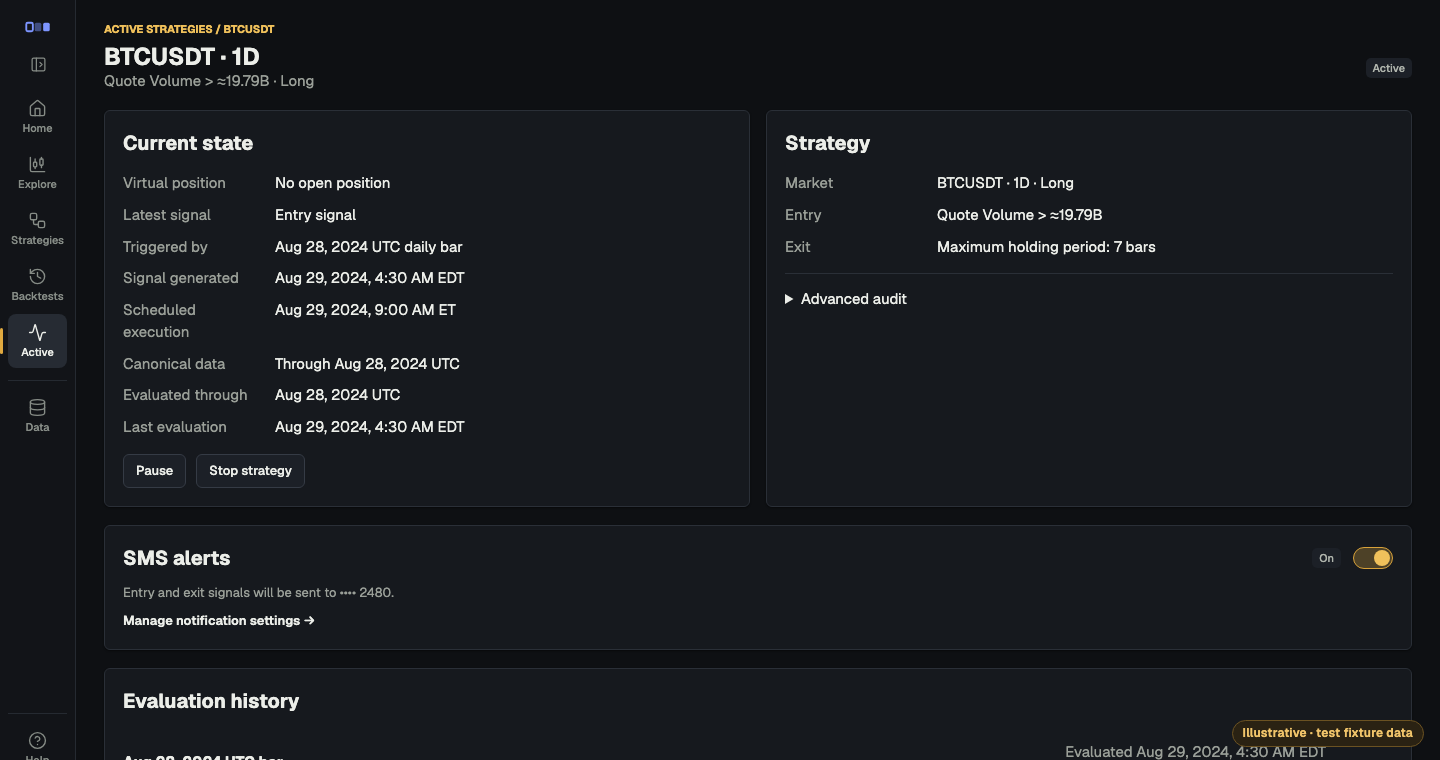
The detail page leads with Current state and Strategy:
- Virtual position — No open position or, for example, Virtual long position.
- Latest signal — No action, Entry signal, Exit signal, Holding, or a timing outcome such as Entry signal missed its execution time.
- For a signal: Triggered by the UTC daily bar that produced it, Signal generated (when the evaluation ran), and Scheduled execution, the reference time in ET.
- Canonical data, Evaluated through and Last evaluation.
Evaluation history lists every evaluation newest first, each with its UTC bar, signal and, for entry and exit signals, what happened to its SMS. Each row with a condition has Condition detail showing why the rule was or wasn't true. Technical identifiers are under Advanced audit.
Market dates, events, scheduled executions
| Kind | Shown as | Example |
|---|---|---|
| Market date — a daily bar's identity | Always UTC | Triggered by Oct 4, 2026 UTC daily bar |
| Event — something that happened | Your browser's time zone | Signal generated Oct 5, 2026, 4:30 AM EDT |
| Scheduled execution — the reference instant | Always New York time | Scheduled execution Oct 5, 2026, 9:00 AM ET |
BTC trades 24/7; 9:00 AM ET is a fixed daily checkpoint, chosen so the previous UTC day's data can be published first. It is not a market open. A signal that can't be generated before its checkpoint is recorded as missed (entry) or moved to the next checkpoint (exit), exactly as in the backtest.
Pause, Resume, Stop
- Pause stops evaluation and cancels a pending entry or exit that hasn't reached its execution time; the signal stays in history. Resume continues with new bars.
- Stop strategy (detail page only) asks for confirmation and is permanent. Activating the same backtest again starts a new Active Strategy; the stopped one keeps its history.
- Evaluation may say Evaluation catching up to … when it lags accepted data.
SMS alerts
SMS alerts are optional, informational texts for entry and exit signals. Setting them up has two levels:
- Once per account, in Settings › Notifications: enter a phone number, choose Send verification code, enter the code, read and check the consent disclosure (unchecked by default), and choose Verify & enable SMS. Verifying a number without consent leaves SMS off.
ResultSettings reads •••• 1234 · Verified and SMS consent — Granted.
- Per strategy, on its detail page: switch SMS alerts on.
ResultThe card reads Entry and exit signals will be sent to •••• 1234.
- Only the last four digits of the number are ever shown.
- Reply STOP to opt out; the card then reads that delivery is paused and how to resume (reply START). The website can't override a carrier STOP.
- Turn off SMS in Settings stops all alerts and keeps per-strategy choices; turning it back on asks for consent again.
- History shows each signal's delivery, such as SMS delivered, SMS failed or SMS not sent · its 9:00 AM ET execution time had passed.
- An SMS describes a signal. It is never an order or a confirmation that one was placed.
The opt-in flow is shown on SMS Opt-In Flow; program terms are in Terms › SMS and data handling in the Privacy Policy.