Strategy Builder: rules, timing, and validation
Strategy Builder (Strategies in the navigation) turns a condition into a complete, testable strategy without code: what to trade, when to enter, when to exit, how much to risk, and how fills are timed. It ends with Validate strategy and a link to Backtests.
On this page · 8 sections
Setup: direction and test window
The header reads BTCUSDT Perpetual · 1D with the accepted data range: market and timeframe are fixed, not choices. The setup row holds:
- Direction — Long or Short.
- Test window — start and end dates in UTC, with presets that stay inside accepted data.
- A short notice only when the window falls outside accepted data or its coverage or data quality couldn't be verified. Reconstructed days and other data notes are listed on the Data page.
Arriving with Use in Strategy Builder from Explore fills the entry rule and the test window from your research range and shows Imported from Explore with the publication it came from. The Builder still checks it against current data and policy when you validate. Continue in Strategy Builder from a finished Event Study shows From Event Study instead and asks you to confirm a short review before Continue to Backtests; see From study to strategy. Adjust in Strategies on a Backtest report imports that run's complete settings instead.
Entry rules
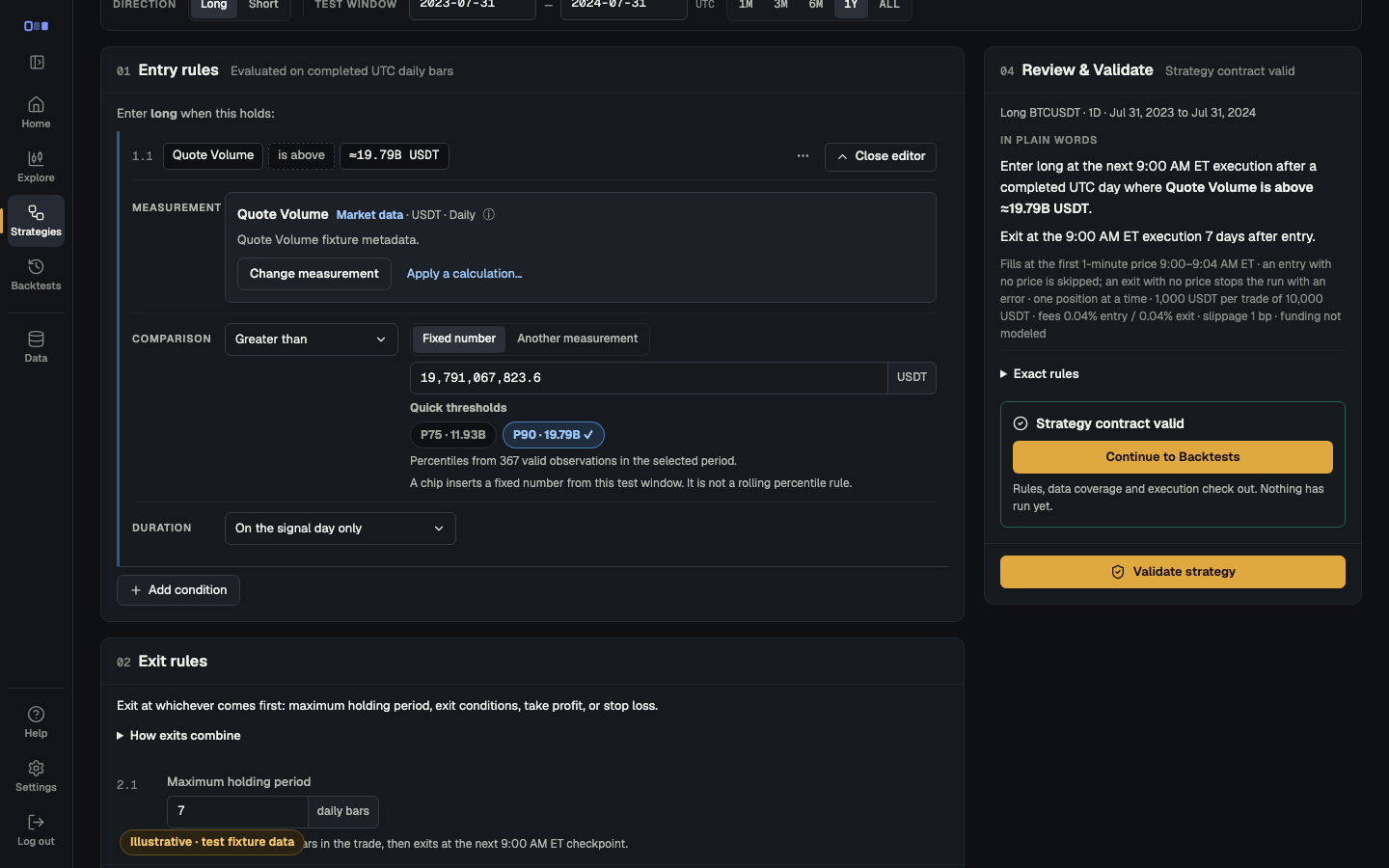
- Under 01 Entry rules, choose the measurement for the first rule.
ResultThe chooser opens with search and two groups, Market data and Indicators & calculations.
- Complete the comparison and, if you want, a duration (next section).
ResultThe rule's sentence updates, for example 50-day EMA of Close > 200-day EMA of Close.
- Add rules as needed and choose All or Any. It is disabled until there are two rules.
ResultThe section reads Enter long when all/any of these hold over numbered rules 1.1, 1.2….
Each rule's ⋯ menu has Invert condition (NOT), Duplicate, Inspect in Explore and Delete (the last entry rule can't be deleted). With two or more rules, Research entry logic in Explore opens the whole combination in Find matches. Rules are evaluated on completed UTC daily bars.
Measurement, comparison, duration
An expanded rule has three parts, shared with Explore's Find matches:
| Part | What you set | Example |
|---|---|---|
| Measurement | Market data, or a calculation with its inputs and parameters such as the lookback period | 3-day total Quote Volume |
| Comparison | An operator, then a Fixed number in the measurement's unit or Another measurement | Greater than 60B USDT |
| Duration | On the signal day only, or For consecutive days and a number | for 2 consecutive days |
- The lookback period belongs to the calculation (how many days one value reads); the duration is how many consecutive days the comparison itself must hold. They are independent.
- Parameters start empty; nothing is filled in for you. Allowed ranges appear inline, for example Use 2–30 for consecutive bars.
- A calculation shows its required initialization, for example how many daily bars an EMA needs before its first value. Bars before that are unknown, not false.
- Values with different units can't be compared, and changing a measurement's unit clears a typed threshold.
- Durations are level-triggered: they stay true on every day of a streak after the Nth. Crossover, divergence and “A then B” sequence rules aren't supported.
Percentile suggestions
For a complete measurement, chips such as P75 and P90 (for “above”), P25 and P10 (for “below”) and P25–P75 or P10–P90 (for ranges) insert a number computed from the measurement's own values in the selected test window, with the count of observations they came from.
Exit rules
02 Exit rules starts with one sentence: Exit at whichever comes first: maximum holding period, exit conditions, take profit, or stop loss.
- 2.1 Maximum holding period — counts completed daily bars in the trade (not hours), then exits at the next checkpoint. Always active.
- 2.2 Exit conditions — optional rules written the same way as entry rules, and lined up with them, checked on each completed daily bar (Add exit condition). With two or more, All/Any applies only within this group.
- 2.3 Take profit / Stop loss — optional percentages that may trigger intraday, without waiting for a checkpoint.
How exits combine, under that sentence, states the details: the first exit that executes closes the trade, and a level touched in the same minute a scheduled exit fills yields to the scheduled exit. When take profit or stop loss is set, both levels are checked on 1-minute prices; if both are touched in the same minute the order can't be known, so the backtest stops with an error rather than assuming either outcome.
Execution timing
The Execution model in 03 Execution & costs decides when entries and scheduled exits fill:
| Model | Fill | Active? |
|---|---|---|
| Scheduled daily · 9:00 AM ET (default) | The rules read the completed UTC daily bar after that day's data is published. Entries and scheduled exits target the first 9:00 AM ET after the signal day closes, at the first validated 1-minute open from 9:00 to 9:04 AM ET. With no price before 9:05 the entry is skipped. A signal not available by 9:00 can't use that checkpoint: an entry is skipped, an exit moves to the next checkpoint. | Required |
| Research only · Next UTC bar open | An idealized assumption: fills at the next UTC bar open, the instant the signal bar closes — before the daily data would exist in production. | Not available |
In both, take profit and stop loss may trigger intraday. Open Timing and availability rules under the select for the full list. Calculations and consecutive-day rules require an admitted model; if yours isn't, a warning under the select offers Switch to Scheduled daily. More detail: Methodology › Execution timing.
Sizing and costs
- Starting equity in USDT, and Trade size: Fixed amount (USDT per trade) or % of equity.
- Execution costs: Entry taker fee and Exit taker fee as percentages, and Slippage in basis points. Type percentages as you read them (0.04 for 0.04%).
- Funding reads Not modeled, and the engine holds one position at a time.
- The sentence under the costs states the execution rule in full: for scheduled daily, the first available 1-minute price between 9:00 and 9:04 AM ET; an entry without a price by 9:05 is skipped, and an exit without one stops the backtest with an error.
Review the defaults rather than accepting them: costs change results materially for short holding periods.
Review & Validate
04 Review & Validate starts with In plain words: one fixed sentence per part of the strategy (entry, maximum hold, exit condition, take profit and stop loss), worded for the chosen execution model. A rule without a sentence template (for example one with NOT) is shown as its exact condition instead of being reworded. The failure rule for take profit and stop loss appears only when you set them.
Exact rules opens the full execution rules and the field list the backtest will read: WHEN, ENTER, EXIT · FIRST TRIGGER WINS, POSITION and COSTS. On a phone, Validate strategy sits in a bar at the bottom of the screen.
- Choose Validate strategy. Local problems — an incomplete rule, an invalid number — are caught first.
ResultProblems are listed with a link to each field; nothing is sent to the server until they're fixed.
- When the draft is complete, the server checks it against current accepted data and capability policy.
ResultStrategy contract valid with Continue to Backtests, or Validation Failed with the server's exact errors.
- Validation checks the rules, data coverage and execution requirements; it doesn't run a backtest or place an order.
- Continue to Backtests opens Ready to run, which shows the strategy in plain words beside the run settings. Nothing starts until you choose Run backtest.
- Any edit after validating resets the status; validate again before continuing.
- Warm-up period means the strategy first becomes eligible part-way through the window; earlier bars stay in the test but can't signal. No eligible bars in this test window means it can't signal at all: choose a later end date or a calculation that needs less history.
Monitoring (Active Strategies) is turned off during the private beta. When it is enabled, only Scheduled daily · 9:00 AM ET strategies without take profit or stop loss can be monitored. See Which backtests can be activated.